
Foundations of Design
The Building Blocks of Good Design
What You Will Learn
By the end of this lesson, you will be able to look at any poster, flyer, or social media graphic and explain why it works—or why it does not. You will understand the four basic principles of design and know how to apply them to your own projects, whether you are designing a church programme, a shop promotion, or a WhatsApp advert for your side business.
The Four Principles of Good Design
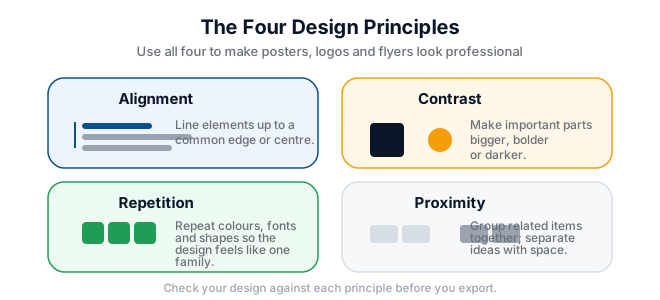
Every professional designer follows four simple rules, often called the CRAP principles: Contrast, Repetition, Alignment, and Proximity. These were made famous by designer Robin Williams, and they apply just as much to a flyer for a Kalomo market stall as they do to a billboard in Lusaka.
1. Contrast
Contrast means making elements different so they stand out. If your heading and body text are both dark blue and the same size, nobody knows what to read first. Contrast can be created with colour, size, weight (bold vs normal), or style.
Example: Imagine a funeral programme where the name of the deceased is written in small, light grey letters at the top. It feels disrespectful and hard to find. Now imagine the name in large, bold black type with plenty of space around it. The second version uses contrast to show importance and dignity.
2. Repetition
Repetition means using the same visual elements throughout a design. If your headings are in one font on page one, keep them in that font on every page. If your logo uses gold and green, use those colours on your business card, flyers, and Facebook cover photo.
Example: A chicken-rearing business called "Kalomo Poultry" uses a red rooster icon on its flyer but switches to a blue chicken on its price list. Customers might think these are two different businesses. Repetition builds trust and recognition.
3. Alignment
Alignment means nothing in your design should look randomly placed. Every item should have a visual connection to something else. Left-aligning all text creates a clean edge down the page. Centre alignment works for formal invitations but can look messy if overused.
Example: A school event poster has the date in the top-left corner, the time in the centre, and the venue in the bottom-right. Your eye jumps around. Aligning all three pieces of information to the left creates order and makes the poster easier to read during load-shedding by candlelight.
4. Proximity
Proximity means grouping related items together. If the address, phone number, and Airtel Money payment details are scattered across the flyer, people will miss them. Put them in one block so the reader sees them as a single unit.
Worked Example: Fixing a Bad Flyer
Let us look at a real-world example. A shop in Soweto Market wants to advertise a promotion: "Maize Meal K120, Cooking Oil K85, Soap K15." The owner types this in black 12-point text on a white background, adds a clipart basket, and prints 50 copies. Nothing stands out.
Here is how we fix it using CRAP:
- Contrast: Make "Special Prices" huge and red. Make the product names bold and the prices even larger.
- Repetition: Use the same red for every price and the same bold font for every product name.
- Alignment: Left-align every line so the left edge is clean.
- Proximity: Group each product with its price, and put the shop name, phone number, and MTN MoMo number together in a box at the bottom.
Try It Yourself
- Find three printed flyers or posters in your community—perhaps from church, a shop, or a school.
- Write down which of the four principles each one uses well and which are missing.
- Using pen and paper, sketch a quick improved version of the weakest flyer.
- Snap a photo of your sketch and save it for your portfolio.
Key Terms
- Contrast: The difference between elements that makes them stand out from one another.
- Repetition: Reusing the same colours, fonts, or shapes to create consistency.
- Alignment: Placing text and images along common edges or centres to create visual order.
- Proximity: Grouping related items close together so they are seen as one unit.
- Hierarchy: Arranging elements to show which is most important and which is least.
Summary
Good design is not about expensive software or artistic talent. It is about structure. When you use contrast, repetition, alignment, and proximity, your posters, flyers, and social media graphics become clearer, more professional, and more persuasive. These four principles are the foundation of everything you will design in this course.
Free Resources
- Canva Design School — free articles and tutorials on design basics.
- W3Schools — simple explanations of visual design concepts.
- GIMP Tutorials — official guides for the free image editor you will use later in this course.