
Module 1: Mobile Money and Zambia's Digital Payment Rails
1.1 How Mobile Money Works Behind the Scenes
What You Will Learn
By the end of this lesson you will be able to explain how mobile money moves from one person to another, describe the roles of the mobile network operator, the agent, and the customer, and understand why a transaction can succeed or fail even when your phone shows a confirmation message.
What Is Mobile Money?
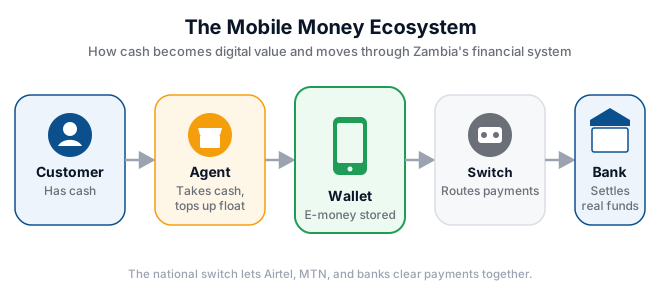
Mobile money is a service that stores funds electronically on your mobile phone number, allowing you to send, receive, and pay without needing a traditional bank account. In Zambia, over ten million adults use mobile money regularly. For a market vendor in Kalomo who sells vegetables at Soweto Market, mobile money means she can accept payment from a customer in Lusaka without ever handling cash. For a farmer in a rural village, it means receiving payment for maize directly on his phone instead of travelling to town.
Unlike a bank account, mobile money is tied to your SIM card and managed by your mobile network operator. Airtel Money and MTN Mobile Money (MoMo) are the two dominant providers in Zambia. When you deposit cash into your mobile wallet, the money does not physically enter your phone. Instead, the mobile network operator records a balance against your phone number in their central system, and you receive an SMS confirming the amount.
The Three Players in Every Transaction
Every mobile money transaction involves three parties. Understanding who they are and what they do helps you troubleshoot problems and avoid scams.
The Customer
The customer is you, the person sending or receiving money. You initiate transactions by dialling a USSD code, using a mobile app, or asking an agent to help. You must protect your PIN because it is the only barrier between a fraudster and your wallet.
The Agent
An agent is a registered business or individual authorised by the mobile network operator to accept cash deposits and process withdrawals. Agents earn a small commission on every transaction. You will recognise them by the branded umbrellas and signs outside shops. Agents hold a balance of physical cash and electronic float, which we will explore in the next lesson.
The Mobile Network Operator
Airtel and MTN run the central systems that record balances, route payments, and settle transactions. Their servers handle millions of transactions daily. When you send K100 to your cousin, the operator debits your wallet and credits theirs, usually within seconds.
How a Send-Money Transaction Works
Let us follow a real transaction step by step. Mrs Banda wants to send K250 to her son at the University of Zambia:
- She opens the Airtel Money app on her Android phone and selects "Send Money."
- She enters her son's phone number and the amount K250.
- The system checks that her wallet balance is at least K250 plus the transaction fee.
- She confirms the details and enters her four-digit PIN.
- The system encrypts the request and sends it to Airtel's transaction server.
- The server verifies her PIN, debits K250 from her wallet, and credits K250 to her son's wallet.
- Both Mrs Banda and her son receive SMS confirmations within seconds.
If Mrs Banda mistypes the phone number, the money goes to a stranger. This is why you must always double-check the recipient's number before confirming. Some systems now show the recipient's registered name as a safety check.
Worked Example: Reversing a Wrong Transfer
Mr Tembo accidentally sends K500 to the wrong number. Here is what he should do:
- He immediately screenshots the confirmation SMS showing the transaction ID and wrong number.
- He dials the mobile money customer care line for his provider.
- He provides the transaction ID, his phone number, the recipient's number, and the amount.
- Customer care places a hold on the funds if they have not yet been withdrawn.
- If the recipient has not spent the money, the operator can reverse the transaction.
- Mr Tembo receives a reversal SMS and the K500 returns to his wallet.
Important: reversals are not guaranteed. If the recipient has already withdrawn the cash, recovery becomes much harder. Prevention is always better than cure.
Try It Yourself
- Open your mobile money app or dial the USSD code for your provider. Check your current balance and write it down.
- Look at your last three transaction receipts or SMS confirmations. Identify the transaction ID on each one.
- Practise sending a small amount, such as K5, to a trusted family member. Double-check the phone number before confirming.
- Find the customer care number for your mobile money provider and save it in your phone contacts.
- Ask your nearest mobile money agent to explain their commission structure for deposits and withdrawals.
Key Terms
- Mobile wallet — the electronic balance stored against your phone number by your mobile network operator.
- USSD code — a short code such as *211# that you dial to access mobile money menus without needing an app.
- Transaction ID — a unique reference number generated for every mobile money transaction, used for tracking and disputes.
- PIN — your secret Personal Identification Number that authorises mobile money transactions.
- Agent — an authorised person or shop where you can deposit or withdraw cash for mobile money.
Summary
Mobile money is not magic. It is a carefully managed system of electronic balances, encrypted messages, and authorised agents. Every transaction moves through your mobile network operator's central servers, and your PIN is the key that unlocks your wallet. By understanding how the system works, you can use it confidently, spot errors quickly, and protect yourself from the most common mistakes such as sending money to the wrong number.