
A1.1 Using Computer Gadgets & Media in Everyday Life
A1.1.1 Parts of a Computer and the Input-Process-Output Cycle
What You Will Learn
By the end of this lesson you will be able to name the main parts of a computer system, classify hardware as input, processing, output or storage, and explain the input-process-output cycle using examples from everyday Zambian life.
What Is a Computer System?
A computer system is made up of hardware and software working together. Hardware is anything you can touch, such as the screen, keyboard, mouse and system unit. Software is the set of instructions that tells the hardware what to do. A computer is useful because it can accept data, process it quickly and accurately, and produce information that helps people make decisions.
The Four Main Hardware Groups
Hardware devices are usually grouped into four categories. Understanding these groups helps you choose, connect and troubleshoot equipment.
- Input devices feed data and instructions into the computer. Examples include the keyboard, mouse, microphone, scanner, webcam, barcode reader and digital camera.
- Processing devices carry out calculations and control the system. The Central Processing Unit (CPU) and Random Access Memory (RAM) are the main processing components.
- Output devices show or produce results. Examples include the monitor, printer, speakers and projector.
- Storage devices keep data safe when the power is switched off. Examples include the hard disk drive, solid-state drive, USB flash drive and memory card.
The Input-Process-Output Cycle
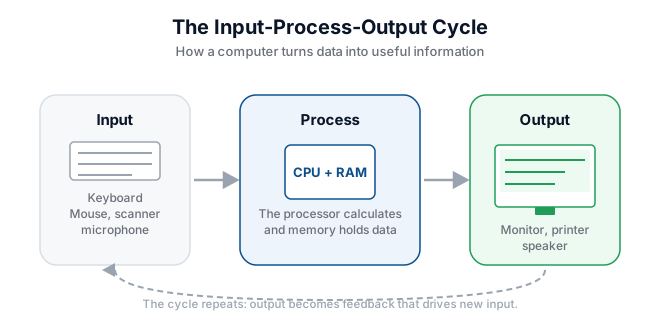
Every useful computer task follows a simple pattern. First, the user provides input. Then the computer processes the input according to a program. Finally, the computer produces output. This is called the input-process-output cycle, or IPO.
Imagine a student at Edutrack Computer Training College who wants to check her marks. She types her student number into the keyboard, which is input. The computer searches the student database and calculates her average, which is processing. The monitor then displays her report, which is output. Without any one of these steps, the task cannot be completed.
Worked Example: Buying a Bus Ticket in Lusaka
When a conductor uses a computerised ticketing system at a Lusaka bus station, the IPO cycle works like this:
- Input: the conductor selects the destination and fare on a touchscreen or keyboard.
- Process: the system calculates the total price, deducts any discounts and records the sale.
- Output: a thermal printer produces the ticket and a small monitor shows the balance.
The same cycle happens in a supermarket till, a mobile money agent's phone and an ATM.
Try It Yourself
- Look at the computer in front of you. List every piece of hardware you can see and classify each as input, processing, output or storage.
- Think about using an ATM to withdraw cash. Write down the input, process and output steps.
- Draw a simple diagram showing the IPO cycle with arrows pointing from Input to Process to Output.
- Explain to a classmate why a touchscreen is both an input and an output device.
Key Terms
- Hardware — the physical parts of a computer that you can touch.
- Software — the programs and instructions that control the hardware.
- Input device — equipment used to send data into a computer.
- Output device — equipment that displays or prints information.
- CPU — Central Processing Unit; the main chip that processes instructions.
- RAM — temporary memory used while the computer is running.
Summary
A computer system consists of input, processing, output and storage hardware directed by software. The input-process-output cycle explains how a computer turns raw data into useful information. Recognising these parts and processes is the first step toward confident computer use at college, in the office or in business.